Product Siddha

Product Analytics

Blog, Product Analytics

HubSpot Mixpanel Integration 2025: Step‑by‑Step Setup, Best Practices & Use Cases

HubSpot Mixpanel Integration 2025: Step‑by‑Step Setup, Best Practices & Use Cases Integrating HubSpot with Mixpanel in 2025 provides businesses with a robust solution to unify customer data, track user behavior, and improve decision-making. While HubSpot serves as a comprehensive customer relationship management (CRM) and marketing automation platform, Mixpanel specializes in advanced user analytics and product behavior insights. The combination of these two tools helps businesses create smarter marketing strategies and deliver personalized experiences based on real-time data. At Product Siddha, we help businesses implement seamless integrations between HubSpot and Mixpanel. This enables teams to gain a holistic view of customer interactions, track conversion funnels, and measure engagement across touchpoints without the typical technical complexity. Why Integrate HubSpot with Mixpanel? HubSpot is widely used for managing inbound marketing, sales pipelines, and customer relationships. It excels at automating emails, managing contacts, and running campaigns. However, it offers limited depth when it comes to detailed behavioral analytics. Mixpanel, on the other hand, focuses on event-based tracking. It enables businesses to understand how users interact with products or digital platforms by capturing granular behavioral data. Integrating the two systems ensures that marketing teams not only manage leads and customer journeys but also understand precisely what drives conversions. Key advantages of the integration include: Enhanced customer segmentation based on behavior and engagement Accurate attribution of marketing efforts to user actions Improved visibility into customer journeys for better targeting Automated syncing of key events and contact data Step‑by‑Step HubSpot Mixpanel Integration Setup Step 1: Define Key Events and Data Points Before connecting HubSpot and Mixpanel, outline the key customer actions and events to track. These typically include: Form submissions Email opens and clicks Website visits and page views Purchase or subscription completions Trial activations This clarity ensures that only relevant data flows between the two systems, reducing noise and improving insights. Step 2: Use an Integration Platform or Custom API Several integration tools exist that facilitate HubSpot and Mixpanel connection without custom coding. Platforms like Zapier, Integromat, or native APIs allow you to automate workflows. Alternatively, Product Siddha recommends building a custom API connection for larger enterprises or unique business models requiring advanced data flows. Example workflow: Set up a trigger in HubSpot for a contact property update (e.g., form submission). Configure an action in Mixpanel to log an event based on that trigger (e.g., “Form Submitted”). Map contact properties such as email, user ID, or campaign source for seamless tracking. Step 3: Test Data Sync Once the integration is configured, test it thoroughly. Ensure that events in HubSpot trigger corresponding events in Mixpanel. Check for: Accurate data mapping (no missing or misaligned properties) Timely syncing (data flows in near real-time) Proper event categorization Validation helps prevent discrepancies that can lead to incorrect marketing decisions. Step 4: Configure Dashboards and Reporting Mixpanel offers powerful funnel analysis, cohort analysis, and retention tracking. Once the integration is active, build dashboards that reflect critical KPIs such as: Conversion rate per marketing campaign User activation trends over time Retention rates by customer segment HubSpot’s dashboard can continue to show lead generation and contact management metrics, while Mixpanel provides deeper behavioral insights. This two-layered visibility helps both marketing and product teams collaborate efficiently. Best Practices for HubSpot Mixpanel Integration Align on Common Identifiers: Ensure consistent unique identifiers (like email address or user ID) across both platforms. This avoids duplication or misattributed events and helps connect CRM data to behavioral data cleanly. Prioritize Relevant Events: Avoid tracking every possible action. Focus on key events that directly relate to business outcomes such as trial sign-ups, product usage milestones, or payment completions. Regularly Audit Data Integrity: Set periodic checks to confirm that event flows remain intact. System updates, API changes, or platform upgrades can sometimes break integrations without clear alerts. Leverage Cohort Analysis: Use Mixpanel’s cohort functionality to segment customers based on behavior patterns. Combine this with HubSpot’s demographic data to deliver targeted marketing campaigns. Automate Workflows with Purpose: Automate follow-up tasks such as sending targeted emails when a customer performs a specific action. Well-crafted automation reduces manual overhead and increases relevance. Real-World Use Cases Case 1: SaaS Subscription Business A SaaS company used Product Siddha’s expertise to integrate HubSpot with Mixpanel. By tracking trial activation events in Mixpanel and syncing them with HubSpot, the marketing team was able to target users who showed high engagement but hadn’t yet converted. This led to a 25% uplift in trial-to-paid conversion rates within three months. Case 2: E-commerce Retailer An online retailer combined HubSpot’s marketing automation with Mixpanel’s behavioral insights to monitor user paths from landing page to checkout. By identifying drop-off points through Mixpanel funnels and triggering personalized emails in HubSpot, cart abandonment rates decreased by 18% over six weeks. The Role of Product Siddha in HubSpot Mixpanel Integration At Product Siddha, we help businesses unlock the full potential of their customer data by implementing tailored HubSpot-Mixpanel integrations. Our approach goes beyond technical setup; we help define strategic KPIs, build data governance frameworks, and develop actionable dashboards that inform decision-making. Whether your organization is just beginning to explore data-driven product management or you need advanced customization, Product Siddha ensures your tools work in harmony. Our experts bring decades of experience to help businesses streamline their data flows, enhance customer insights, and optimize marketing effectiveness. Conclusion Integrating HubSpot with Mixpanel in 2025 is more than a technical task; it is a strategic investment. It enables businesses to move beyond fragmented data silos and gain a unified view of the customer journey. The combination of HubSpot’s CRM and marketing automation capabilities with Mixpanel’s event-driven analytics empowers businesses to make informed decisions, automate processes, and improve user engagement. For organizations seeking to sharpen their product and marketing strategies, adopting this integration with the guidance of an expert AI Automation Agency like Product Siddha is a logical next step. It drives efficiency, accelerates insights, and ultimately supports sustainable business growth. Frequently Asked Questions (FAQs) 1. What are the key benefits of integrating HubSpot with Mixpanel? Integrating HubSpot with

Case Studies, Product Analytics

Driving Growth for a U.S. Music App with Full-Stack Mixpanel Analytics

Driving Growth for a U.S. Music App with Full-Stack Mixpanel Analytics Client Kingfisher Digital Product Snobs (Swipe-based music discovery app) Service Provider Product Siddha Industry Music / Mobile Apps / Consumer Tech Service Mixpanel Integration, Analytics Strategy & Dashboard Setup The Problem: Swipes, Streams… but No Direction Snobs is a swipe-based app that helps people in the U.S. discover music from over 150+ subgenres. Users explore short music clips and swipe right to add artists to their favorites. The app was growing, but the team didn’t have a clear picture of what was working. Here’s what was missing: No tracking of how often users engaged with swipes No clear signal for user activation Couldn’t tell who the power users were Drop-offs in the onboarding journey were a mystery Trial-to-paid conversions weren’t well understood Teams relied too much on analysts for reports Snobs needed a smarter system to track product usage, understand behavior, and drive real growth. The Solution: Full-Stack Mixpanel Analytics Setup Product Siddha rolled out a complete analytics solution using Mixpanel, designed specifically for a swipe-based music discovery experience. Here’s what we did to unlock product growth: Mapped the Entire User Journey in Mixpanel We set up tracking across all the key touchpoints inside the app: First swipe Right vs left swipe count Artist follows Time spent per session Playlist creations In-app trial activations Paid plan signups These events gave the Snobs team full visibility into how users explored music inside the app. These events gave the Snobs team full visibility into how users explored music inside the app. Built Custom Dashboards by Stage To make the data usable, we created dashboards for each part of the user lifecycle: Activation Dashboard How many users swiped at least X times in the first 30 days Helped define a clear activation benchmark Showed which users were exploring music vs those who churned early Conversion Dashboard Compared free trial users to paying subscribers Helped spot what actions led to paid upgrades Led to better CTAs and trial experience tweaks Engagement Dashboard Tracked average swipes per session Measured time spent and session frequency Helped identify power users and top features Retention Curves Showed how long users stayed active Identified patterns among users who returned after a gap Allowed for better re-engagement strategy planning Onboarding Funnel Tracked every step from app open → first swipe Found drop-off points and improved onboarding screens Empowered All Teams with Self-Serve Analytics We trained the product, growth, and marketing teams to: Explore dashboards without coding Run weekly product experiments Compare cohorts over time Now, they no longer rely on analysts. They could act fast and test ideas weekly. Now, they no longer rely on analysts. They could act fast and test ideas weekly. The Outcome: Swipe-Based Growth, Backed by Data With Product Siddha’s full-stack analytics setup, Snobs moved from guessing to growing, using real user behavior. Key Wins: Activation insights: Swipe thresholds tied to long-term retention Conversion optimization: Improved trial-to-paid journey Experimentation speed: New features are tested every week Power user focus: Features shaped around the top 10% of users No analyst needed: PMs and marketers owned the data Measurable Results: Clear engagement metrics tied to feature usage 100% visibility into onboarding and drop-off stages Faster release cycles with real-time data Smarter personalization based on user patterns Conclusion: From Music Discovery to Data-Driven Growth Snobs is more than a music app; it’s a swipe-powered experience built on curiosity and sound. With help from Product Siddha, they now have a powerful analytics engine behind that experience. From user onboarding to retention, everything is tracked, tested, and improved. Whether you’re building a music app, social platform, or mobile product, real growth starts with real data. 📞 Let Product Siddha help you turn user behavior into business results.

Case Studies, Product Analytics

Product Analytics for a Ride-Hailing App with Mixpanel

Product Analytics for a Ride-Hailing App with Mixpanel Client Ride-Hailing Mobile App Service Provider Product Siddha Industry Transportation / Mobile App Service Product Analytics Implementation using Mixpanel The Problem: No Clear View of How Users Book Rides The client runs a ride-hailing app. They wanted to better understand how users moved from installing the app to completing a ride. But there were several problems: Missing event tracking: There was no intuitive way to see what users were doing inside the app, like where they dropped off or how long it took to book a ride, without having to visit the app logs/backend. No organized data structure: The teams couldn’t trust the numbers because there was no proper naming or structure. Lack of funnel visibility: Product/Marketing team couldn’t track the full ride journey – install, sign-up, payment, and ride completion. Slow decision-making: Product and marketing teams were guessing instead of using real data to improve the app. They needed a strong analytics system to track user actions clearly and help teams make smarter, faster decisions. The Solution: Smart Mixpanel Setup for End-to-End Tracking Product Siddha stepped in to create a complete product analytics solution using Mixpanel, a powerful tool for tracking user behavior. Here’s how they did it: Full Event Tracking Plan The team designed and set up a complete event tracking plan. This plan captured all the key actions users took in the app—like signing up, selecting rides, making payments, and completing rides. Built a Scalable Data Taxonomy To keep everything clean and easy to manage, a data taxonomy and schema was created. This included: Ride lifecycle (start to finish) Payments and cancellations User actions and traits (such as device type, location, etc.) With this system, teams could easily track and compare data across all parts of the app. Funnel Visibility from Start to Finish Mixpanel was set up to track the entire user journey, from app install to the first completed ride. The analytics showed exactly where users dropped off and which parts of the ride process needed fixing. Dashboards for Everyone Custom Mixpanel dashboards were built for each team—marketing, product, and operations. These dashboards made it easy to see real-time results and understand user behavior at every step. The Outcome: Clear Data, Faster Growth, Better Rides The new analytics setup gave the ride-hailing app a complete view of how users behaved. In just 30 days, the team saw big results: +13.5% increase in funnel completion rate – More users finished the ride booking process because drop-off points were fixed. Faster decision-making – Teams used dashboards to track real-time trends and test new ideas. Improved user experience – With better data, the app was updated to match how users actually used it. Scalable tracking – The clean schema and taxonomy made it easy to add new features without breaking the system. Conclusion: Clear Analytics That Drive Better Rides and Results This case study shows how Product Siddha used Mixpanel to bring smart product analytics to a fast-moving ride-hailing app. With better tracking, real-time data, and easy-to-use dashboards, the company made quick improvements that boosted user engagement and completed rides. If your mobile app needs clear insights and smarter funnels, Product Siddha can build the right system for you.

Case Studies, Product Analytics

Product Analytics & Full-Funnel Attribution for a SaaS Coaching Platform

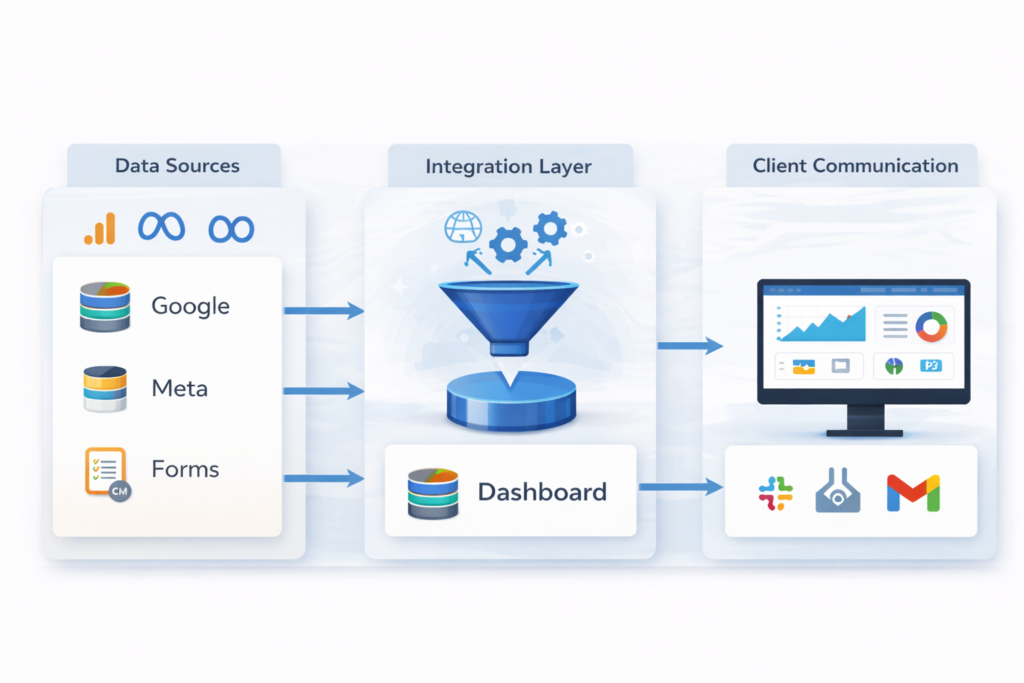
Product Analytics & Full-Funnel Attribution for a SaaS Coaching Platform Client SaaS Platform for Coaching Businesses Service Provider Product Siddha Industry SaaS / Coaching Services Service Product Analytics & Full-Funnel Attribution The Problem: Hard-to-Track User Behavior and Marketing Performance The client is a SaaS company that provides tools for coaching businesses. They had trouble knowing how their users moved through the platform. In simple terms, they needed to understand how visitors became active users, stayed engaged, and eventually paid for the service. The challenges were clear: Unclear user journey: It was hard to track all the actions that users took on different parts of the platform. No full-funnel attribution: The company could not see the complete path from when a user clicked a Meta ad to when they signed up or paid. Gaps in data flow: There was a disconnect between different systems. Data from Meta Ads, HubSpot CRM, and the client app did not flow together smoothly. Lack of real-time insights: The client did not have live dashboards to see daily active users (DAUs), feature engagement, or where users dropped off in the funnel. Without clear and connected data, it was very hard for the company to make smart decisions that could boost growth. The Solution: A Powerful, End-to-End Analytics and Attribution System Product Siddha stepped in to build a complete solution that connected every step of the user journey and brought all the data together. Here’s how the solution worked: Amplitude Implementation from Scratch They set up Amplitude, a top product analytics tool, from the ground up. This tool was used to map how users interacted with various features on the platform. By tracking every action from sign up to subscription, the system provided clear insights into activation, retention, and conversion. Seamless Data Flow with Custom API Integration The team created a custom API solution that tied together different systems. Data from Meta ads, Hubspot and client’s application was smoothly connected with Amplitude, without any instance of duplicate user profiles. This seamless data flow allowed the company to track the entire customer journey. Every ad click, trial signup, and subscription was now linked in one complete picture. Live Dashboards for Real-Time Insights Live dashboards were set up to show key performance metrics. These dashboards displayed: Daily Active Users (DAUs) The split between trial users and paid subscribers Engagement with platform features Drop-off points along the user journey These live views meant the client could see what was working and what needed improvement right away. Insight-Led Growth and Campaign Optimization The product analytics solution helped the client identify the top behaviors among their user base. They found the top five actions that led to higher conversion rates. With this insight, the company was able to optimize their marketing campaigns and product features to boost growth. It was no longer guesswork; it was data-driven decision-making. The Outcome: Full-Funnel Visibility and Measurable Growth After implementing Product Siddha’s end-to-end analytics solution, the client achieved significant results across key business metrics: 92% of user behavior tracked: The analytics setup provided visibility into nearly all meaningful user actions, helping the team pinpoint exactly how users activated, engaged, and converted. 30% increase in paid conversions: By identifying the top five behaviors that led to subscriptions, the team improved onboarding and feature usage, resulting in a measurable boost in paid sign-ups. 18% higher retention rate: With clearer insight into feature engagement, the platform optimized product experiences that encouraged users to stick around longer. 35% improvement in marketing ROI: Connecting Meta Ads to HubSpot and Amplitude allowed precise attribution, helping the team focus spend on high-performing campaigns. 3x faster decision-making: Live dashboards enabled leadership and marketing teams to react in real time to user trends and campaign results—reducing decision cycles from days to hours. 40% growth in active user base (QoQ): With better data and continuous optimization, the company scaled its coaching user base and expanded its reach more efficiently. Conclusion: Data-Driven Insights That Power Smarter SaaS Growth This case study shows how Product Siddha leverages cutting-edge product analytics and full-funnel attribution techniques to drive clarity, efficiency, and growth for SaaS companies in the coaching space. If you need help mapping your customer journey and turning data into action, Product Siddha is ready to help you succeed.