
Customer.io Implementation Guide: Everything You Need to Know
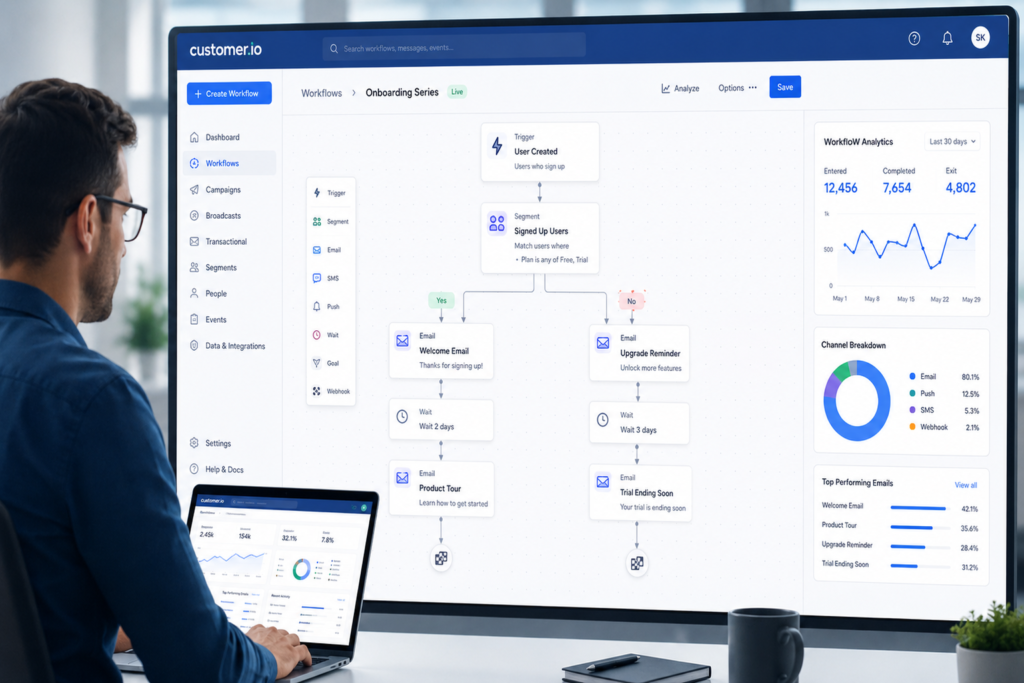
Customer.io Implementation Guide: Everything You Need to Know Getting Started with Customer Engagement Systems Modern customer communication depends on systems that can react to user behavior in real time. Email blasts and static campaigns no longer fit businesses that deal with product-led growth or multi-channel user journeys. This is where Customer.io implementation becomes relevant for teams that want structured, event-driven messaging. Customer.io is a customer engagement platform designed around behavioral data. It allows businesses to send emails, SMS, push notifications, and in-app messages based on real user actions rather than static lists. At Product Siddha, implementation projects usually start with one question: how does user data flow from the product into communication systems. Without this clarity, even advanced tools produce inconsistent results. Understanding the System Before Setup Before any Customer.io implementation begins, it is important to understand how the platform works at a structural level. Customer.io depends on three core components: Events (user actions like signup, purchase, or inactivity) Attributes (user properties such as location or plan type) Campaign logic (rules that decide when messages are sent) These three elements work together to trigger communication flows. For example: If a user signs up but does not complete onboarding within 48 hours, an email sequence can be triggered automatically. This logic sounds simple, but execution depends heavily on clean data and correct event mapping. SaaS Onboarding Flow To understand Customer.io implementation in a practical way, consider a SaaS product that offers project management tools. Scenario A user signs up for a free trial but does not create their first project. Required Setup Event tracking: user_signed_up project_created onboarding_completed Attribute tracking: plan_type signup_source company_size Campaign logic: If user_signed_up AND NOT project_created within 24 hours → trigger onboarding email If no activity within 72 hours → send reminder message This structure allows communication to match user behavior rather than assumptions. Core Steps in Customer.io Implementation 1. Data Integration Setup The first step in Customer.io implementation is connecting your product data. This usually involves: API integration or SDK installation Event tracking setup in backend or frontend systems Mapping user identity across platforms A common mistake is sending incomplete or inconsistent event data. This leads to broken automation flows and unreliable segmentation. 2. Event and Attribute Design Good implementation depends on how events are structured. Example event structure: Event Name Trigger Purpose user_signed_up Account creation Start onboarding flow trial_started First product access Measure activation feature_used Feature interaction Track engagement depth Attributes example: Attribute Example Value Use Case plan_type free / pro Segment messaging company_size 10-50 users Personalization signup_source google_ads Attribution Poor event design leads to fragmented communication logic. 3. Audience Segmentation Setup Customer.io allows segmentation based on behavior and attributes. Example segments: Users who signed up but did not activate Users who completed onboarding but did not upgrade Active users with high engagement score Segmentation is where Customer.io implementation starts affecting business outcomes directly. Clean segmentation improves targeting accuracy. 4. Workflow and Campaign Design Workflows define how messages move through time. Example onboarding workflow: Day 0: Welcome email Day 1: Product tutorial Day 3: Feature highlight email Day 5: Feedback request Each step depends on user behavior, not fixed schedules. Visual Workflow Diagram User Signup ↓ Event Trigger: user_signed_up ↓ Check: project_created? ↓ No → Send onboarding email ↓ User engages or ignores ↓ Next message based on behavior Common Implementation Mistakes Even experienced teams face issues during Customer.io implementation. 1. Incomplete event tracking Missing events break automation logic. 2. Over-segmentation Too many segments create fragmented campaigns. 3. Poor identity resolution Same user across devices not linked correctly. 4. No alignment between product and marketing teams Messaging becomes inconsistent with product experience. At Product Siddha, most fixes involve correcting data flow rather than campaign logic. Integration With Other Systems Customer.io rarely works alone. It is usually connected to: CRM systems like HubSpot or Salesforce Analytics tools like Mixpanel or GA4 Data warehouses like BigQuery Product databases via APIs Example integration flow: User Action → Backend Event → Customer.io → Email/SMS Trigger → Analytics Tracking This structure ensures every message is tied to measurable behavior. Measuring ROI After Implementation ROI from Customer.io implementation is not measured by messages sent. It is measured through: Activation rate improvement Reduction in churn rate Increase in repeat usage Conversion from free to paid plans Example KPI table: Metric Before Implementation After Implementation Activation Rate 22% 38% Trial Conversion 8% 14% Churn Rate 12% 7% These improvements depend heavily on correct setup rather than tool usage alone. Role of Product Siddha in Implementation Product Siddha focuses on Customer.io implementation from a systems perspective rather than only campaign setup. Key areas include: Event architecture design Data pipeline structuring Integration with CRM and analytics tools Lifecycle workflow planning This ensures that engagement systems work with business data instead of operating in isolation. Final Perspective Customer.io is not just an email or messaging tool. It is a behavioral communication system that depends entirely on how well user data is structured and interpreted. A successful Customer.io implementation requires clarity in event design, disciplined segmentation, and strong integration with product and data systems. When these elements are aligned, businesses can move from manual communication to structured lifecycle engagement that reflects real user behavior.