Product Siddha

Author name: Sahil Sanghar

AI Automation, Blog

Start an AI Automation Agency in 7 Days: Step-by-Step Guide

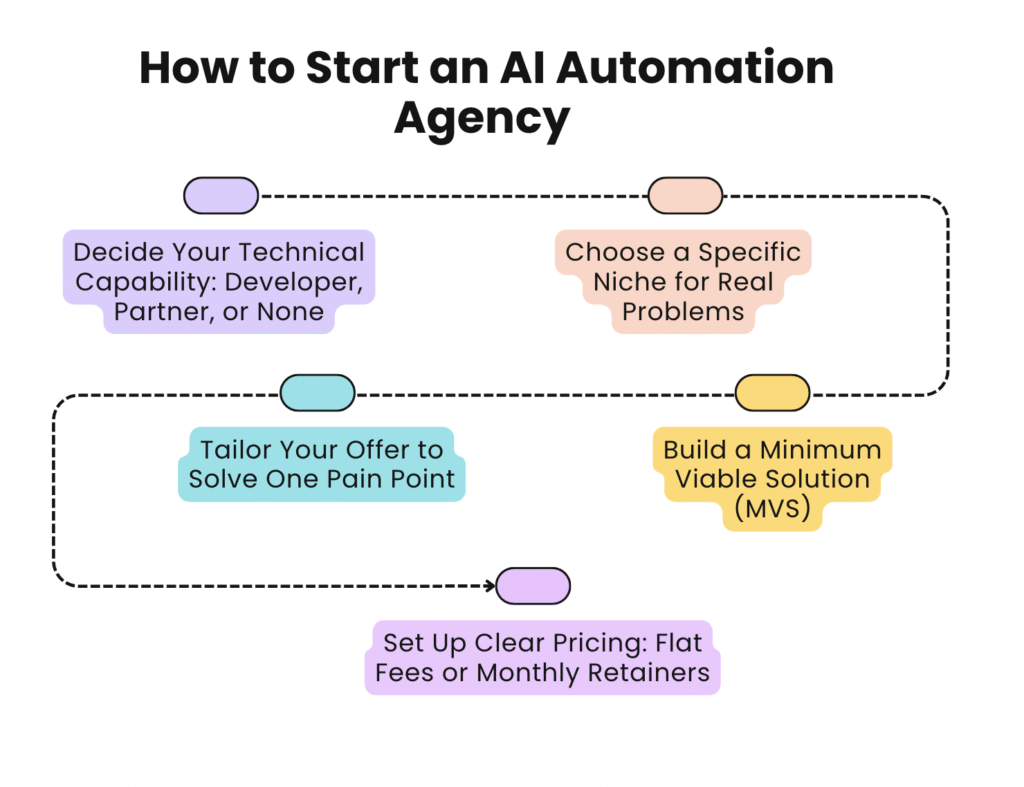
Start an AI Automation Agency in 7 Days: Step-by-Step Guide Why AI Automation Agencies Are Growing Businesses today are under pressure to move faster while reducing costs. Manual processes in marketing, operations, and customer support limit efficiency. Artificial Intelligence tools make it possible to automate repetitive work, personalise communication, and scale decisions with data. This is why demand for AI automation services has increased among startups, enterprises, and B2B brands. An AI automation agency helps organisations adopt the right tools and strategies to improve efficiency and growth. Companies like Product Siddha have already shown how combining product management skills with automation expertise can transform businesses. In one of their client cases, Product Siddha streamlined a SaaS firm’s onboarding workflow using AI-driven communication, resulting in a nearly 25% reduction in customer drop-offs. If you want to build a business in this space, you do not need years of preparation. With a focused approach, it is possible to launch an AI automation agency in a single week. Day 1 – Define Your Niche and Value The first day should be devoted to clarity. AI automation covers several areas: Sales outreach Customer support Marketing campaigns Workflow automation Data-driven decision support Instead of offering everything at once, begin by choosing a focused niche. For example, you may specialise in AI-powered email automation for B2B sales or chatbot solutions for e-commerce brands. Your value proposition should be clear in one line. Example: “We help subscription brands reduce churn with AI-driven lifecycle automation.” This helps you stand out in a competitive market. Day 2 – Set Up the Business Foundation Once you have your niche, focus on the structure of your agency. Register a simple business entity. Secure a professional domain name and create a website. Use clear positioning on your homepage with services, case studies, and contact details. If you do not have a portfolio yet, highlight your methodology and include insights from trusted partners. Product Siddha often showcases frameworks, not just results, which builds credibility with clients. Day 3 – Choose Tools and Platforms Your agency is only as strong as the tools it deploys. On day three, select platforms that allow you to deliver automation with reliability. Some common categories include: CRM Automation: HubSpot, Zoho, Salesforce Email and Marketing Automation: ActiveCampaign, Klaviyo, Mailchimp with AI add-ons Workflow Automation: Zapier, Make (formerly Integromat), n8n AI Enhancements: GPT-based assistants, custom models, AI scheduling tools You do not need every tool. Begin with one or two and master them. For instance, Product Siddha often integrates CRM data with automated workflows to give B2B firms a complete view of their funnel. Day 4 – Build a Pilot Solution Rather than preparing documents or long proposals, create a working pilot on day four. Example projects: An automated email sequence triggered by customer actions. A chatbot that qualifies leads before routing them to sales. A dashboard that pulls customer feedback into one view. This pilot will act as your showcase when speaking with clients. It demonstrates practical knowledge rather than just theory. Day 5 – Develop Outreach Strategy Now that you have a foundation and a pilot, you need your first clients. On day five, focus on outreach. Effective methods: LinkedIn connections with personalised messages. Cold email campaigns (ironically, a place to use your own automation). Partnerships with small agencies that lack AI expertise. Instead of sending generic emails, focus on pain points. A good message might be: “I noticed your company relies on manual customer follow-ups. We recently helped a SaaS firm cut their drop-off rate by 25% using AI automation. Would you like me to share how?” This approach mirrors the value-driven outreach style Product Siddha applies in its consulting projects. Day 6 – Pricing and Packaging By the sixth day, you should decide how to price your services. Options include: Project-based (one-time automation setup). Retainer-based (ongoing optimisation and monitoring). Hybrid (setup plus monthly support). Start simple. Offer a pilot project at a fixed cost, then move into retainers. Product Siddha often begins client relationships with a single focused solution before expanding into larger, long-term engagements. Transparency in pricing builds trust. Avoid over-promising or presenting unclear packages. Day 7 – Launch and Refine On the final day, make your presence public. Publish your first case study or pilot demo on your website. Share practical insights on LinkedIn or industry forums. Announce your new agency with a clear service statement. From here, refinement is ongoing. Collect feedback from early clients, improve processes, and expand capabilities step by step. Case Study – Scaling Onboarding with AI Product Siddha shows how intelligent automation can transform user engagement. A growing SaaS brand was struggling with manual onboarding emails. New users were signing up, but most were not completing their activation steps. The support team was overloaded with repeated queries, and conversion from free trial to paid plan remained low. To address this, Product Siddha designed an AI-powered onboarding sequence. The system tracked user actions inside the product and adjusted email prompts accordingly. A user who skipped setup received a guided walkthrough, while someone who completed setup early received advanced tips and upgrade nudges. The sequence was no longer static but adaptive, ensuring relevance at every stage. Within the first quarter of implementation, activation rates rose by 27 percent and support tickets related to onboarding dropped by nearly 40 percent. The automation not only reduced internal workload but also created a smoother experience for users. The key takeaway for businesses exploring AI email marketing is clear: even modest interventions, such as personalised onboarding flows, can generate measurable improvements in engagement, support efficiency, and long-term customer retention. What You Need to Remember Starting an AI automation agency in seven days is realistic if you keep the process simple. Focus on: Picking one niche. Building a quick pilot. Reaching out with value-driven communication. Learning and refining with every client. The journey does not end after the first week. Real growth comes from consistent delivery and trust-building. Companies like Product Siddha show that combining
Blog, MarTech Implementation

The 2025 Martech Stack: HubSpot, Klaviyo & Segment Integration

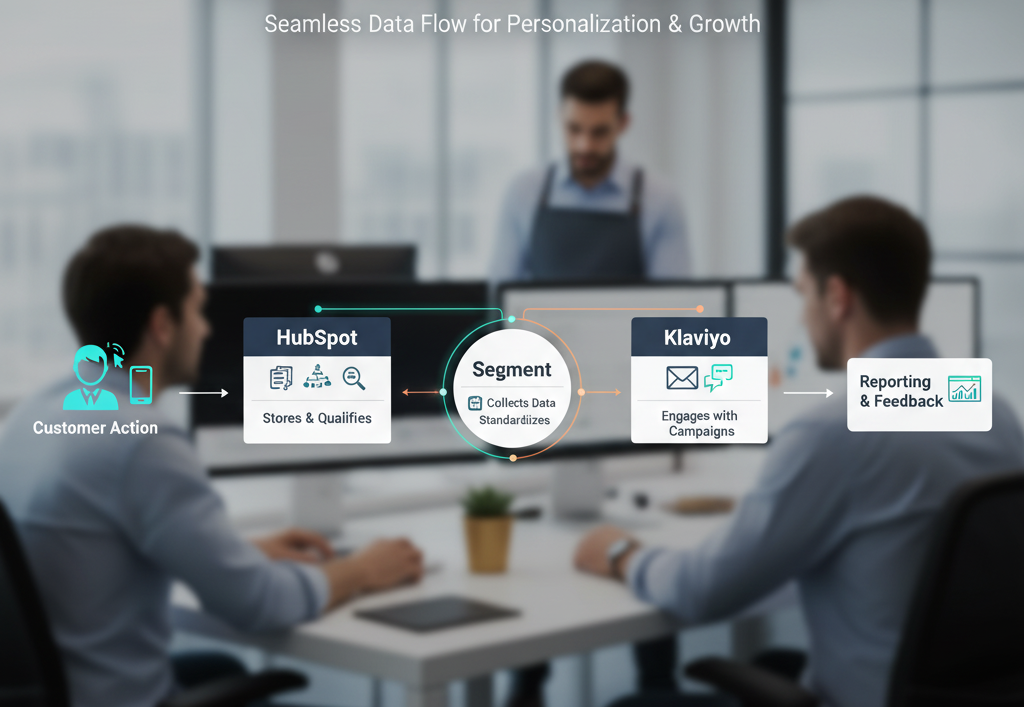
The 2025 Martech Stack: HubSpot, Klaviyo & Segment Integration Building a Cohesive Martech Stack in 2025 Modern organizations face a constant challenge in making marketing systems work together. Data flows from multiple sources, customer expectations keep rising, and teams cannot afford inefficiency. In this setting, the Martech stack has become central to product management and long-term planning. Among the many options available, three tools stand out: HubSpot, Klaviyo, and Segment. When combined correctly, they give marketing and product leaders a clear view of their customers while ensuring campaigns are both personal and timely. Why Integration Matters Using HubSpot, Klaviyo, or Segment in isolation has value, but the real advantage comes from integration. HubSpot manages customer relationships and inbound activity. Klaviyo delivers powerful automation for email and SMS campaigns. Segment acts as the data pipeline, collecting, cleaning, and distributing information across the stack. Without integration, data silos develop, teams duplicate effort, and decision-making slows down. With integration, customer journeys become clear, reporting improves, and campaigns run with precision. Core Role of HubSpot HubSpot continues to serve as a reliable foundation for customer relationship management. It captures leads, organizes contacts, and enables sales pipelines to function without confusion. For product managers, HubSpot gives visibility into how users first interact with a business, whether through a form submission, a website visit, or a campaign touchpoint. This level of detail informs product roadmaps and helps teams prioritize features. Strength of Klaviyo Klaviyo is widely used for lifecycle marketing. Its ability to create targeted automations allows teams to deliver the right message at the right time. A customer who abandons a cart can be reminded within hours. A loyal user can receive personalized offers that reflect past behavior. Klaviyo’s analytics also make it clear which messages work and which need adjustment. For product management, this insight shows how communication affects adoption and engagement. Function of Segment Segment operates in the background but has a central role. It collects data from websites, mobile apps, and third-party tools, then standardizes it for distribution. Instead of setting up separate integrations for every platform, Segment acts as the hub. This ensures that the same customer record flows through HubSpot and Klaviyo without conflict. With Segment in place, marketing teams can trust that data is accurate, consistent, and ready for use. Case Reference: Product Siddha’s Approach Product Siddha has guided organizations in building unified Martech stacks where these three platforms work together. One example involved a retail company that struggled with fragmented data. HubSpot was tracking sales leads, Klaviyo was managing email campaigns, and the analytics team was pulling reports manually from multiple systems. By introducing Segment as the central connector, Product Siddha created a single source of truth. Data flowed cleanly between platforms, reducing manual reporting and giving managers a clearer view of customer behavior. The change not only improved campaign accuracy but also helped product teams understand how engagement translated to long-term retention. Step-by-Step Integration Framework Define Objectives Begin with clear goals. Decide whether the focus is on lead conversion, customer retention, or improved analytics. Establish Data Flow Map how information should move between HubSpot, Klaviyo, and Segment. Typically, Segment collects the raw data, HubSpot manages lead and contact details, and Klaviyo activates the communication layer. Set Event Tracking Configure Segment to capture critical events such as sign-ups, purchases, or feature use. These events feed both HubSpot and Klaviyo, giving consistent visibility. Align Marketing Automations Create Klaviyo flows that respond to Segment events and use HubSpot insights for audience segmentation. For example, a lead marked as “high intent” in HubSpot can trigger a Klaviyo sequence. Test and Refine Run pilot campaigns to ensure data sync works correctly. Adjust automation rules to avoid duplication or missed opportunities. MarTech Stack Workflow [Customer Action] → [Segment Collects Data] → [HubSpot Stores & Qualifies] → [Klaviyo Engages with Campaigns] → [Reporting & Feedback] This linear flow makes clear how the three systems complement each other when properly aligned. Practical Benefits for Product Management Integrating HubSpot, Klaviyo, and Segment produces several outcomes directly relevant to product managers: Unified Customer Profiles – Every action, from signup to purchase, feeds into a single record. Improved Campaign Precision – Targeting rules rely on accurate data instead of outdated lists. Faster Roadmap Decisions – Data on customer behavior helps prioritize product features with real evidence. Resource Efficiency – Reduced manual reporting saves time and avoids errors. Common Challenges and How to Overcome Them Data Duplication If mapping rules are unclear, the same customer may appear in multiple forms. This can be avoided by carefully defining a primary identifier. Team Alignment Marketing, sales, and product functions must agree on event definitions. Without agreement, reporting becomes fragmented. Platform Updates Tools evolve, and integrations may break. Regular monitoring ensures the stack continues to function smoothly. Product Siddha emphasizes structured governance to prevent these issues. By setting clear rules for ownership and updates, organizations maintain long-term value from their Martech investment. Looking Forward to 2025 The Martech landscape continues to expand, but integration remains the defining challenge. Tools will keep improving, but without a coherent framework, teams risk inefficiency. HubSpot, Klaviyo, and Segment form a strong core that balances relationship management, communication, and data accuracy. For companies investing in growth, building a seamless connection between them is less a choice and more a necessity. Product Siddha continues to refine methods that ensure integration does not become a burden but a competitive advantage. Final Thoughts The success of a Martech stack depends on how well its parts work together. In 2025, HubSpot, Klaviyo, and Segment stand out not only for their individual strengths but for the synergy they create. When aligned, they give marketing and product teams clarity, efficiency, and confidence in decision-making. Product Siddha’s consulting experience shows that integration, once achieved, becomes a foundation for long-term product and customer success.

Blog, Product Management

How Framer Redefines Product Prototyping in 2025

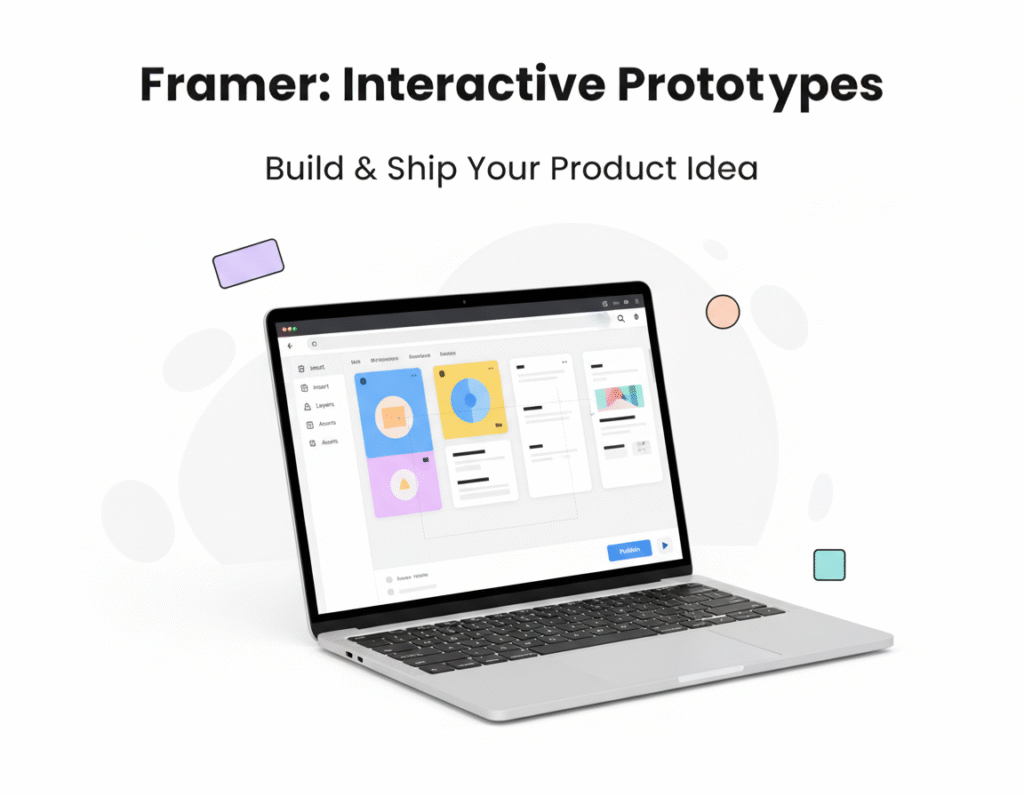
How Framer Redefines Product Prototyping in 2025 Rethinking Prototyping Tools Design and prototyping tools have always shaped the way teams approach new products. For years, product managers and design leads relied on static wireframes or heavy development input to validate an idea. Today, Framer has emerged as a tool that simplifies the process while offering greater realism in product prototypes. Unlike earlier approaches, Framer lets product teams create interactive designs that feel close to the final product. This ability makes conversations with stakeholders, engineers, and users far more productive. Why Prototyping Matters in Product Management In product management, prototypes are not just visuals. They are working references that bring clarity to a roadmap, test assumptions, and save resources by exposing weak points before development. A strong prototype also allows a team to communicate intent across functions. Product Siddha has observed that projects with well-prepared prototypes reduce engineering rework and shorten time-to-market. This benefit is particularly important when multiple stakeholders, from marketing to technical operations, are involved in decision-making. What Sets Framer Apart Several aspects make Framer stand out from older prototyping tools: Interactive Depth – Instead of clicking through flat screens, users can engage with transitions, animations, and flows that mimic a live product. Realistic Testing – Teams can gather user feedback on a product experience that feels real, not just suggested. Direct Collaboration – Framer allows real-time collaboration between designers and product managers, creating fewer gaps between design intention and management priorities. Code Integration – Framer integrates design with production-ready elements, which bridges the common divide between product management and engineering. These strengths create a working environment where design is no longer separate from strategic planning. Practical Example: Rapid Idea Validation with Framer At Product Siddha, a global product management consulting company, we partnered with a non-technical founder who wanted to test out their product idea before investing heavily in development. Instead of relying on static wireframes, which often fail to capture the true product experience, our team used Framer to build an interactive prototype in under two weeks. The prototype not only looked like a real product but also allowed potential users and investors to engage with the core workflows. This early validation gave the founder clarity on what to build, reduced risk, and saved both time and money. The case highlights how rapid prototyping with Framer empowers non-tech founders to validate ideas faster and make informed product decisions without unnecessary delays. How Product Managers Use Framer to Their Advantage Framer is more than a designer’s tool. For product managers, it becomes a practical companion in these ways: Testing Assumptions Early Product managers can validate workflows or navigation paths with users before development starts. This early validation prevents costly missteps. Stronger Stakeholder Buy-In Instead of abstract slides, managers present a near-functional model. This increases confidence among leadership and investors. Alignment with Developers With Framer’s code-ready environment, the handoff from design to engineering becomes smoother. Managers find fewer surprises when development begins. Time and Cost Efficiency Every round of development changes translates to budget strain. Framer cuts unnecessary rework by clarifying details earlier in the product journey. Comparing Framer with Other Tools While tools like Figma, Sketch, or Adobe XD still dominate design workflows, Framer distinguishes itself with interactivity and speed of building high-fidelity prototypes. Where Figma excels in design collaboration, Framer excels in creating experiences that mirror a functioning product. For a product manager balancing multiple priorities, this realism is not just convenient. It is a critical factor in decision-making and alignment. Tool Best For Key Limitation Compared to Framer Figma Collaborative wireframing Prototypes often feel static Sketch Design flexibility Limited interactivity Adobe XD Visual polish Slower for interactive testing Framer High-fidelity prototyping Learning curve for beginners This comparison highlights why more product managers are integrating Framer into their toolkit alongside existing design platforms. Framer’s Role in the 2025 Product Management Landscape As product cycles become shorter, the ability to test, iterate, and validate ideas quickly is no longer optional. Framer supports this need by letting product managers and designers merge their processes. Product Siddha’s consulting work shows that companies using Framer can cut prototyping phases by as much as 30 percent. This efficiency not only speeds up launches but also improves the accuracy of user-driven insights. Looking Ahead Framer’s growing popularity signals a broader shift in how product management teams approach early-stage work. No longer seen as a designer-only tool, it is becoming part of the strategic decision process. For organizations seeking faster feedback, better alignment, and reduced costs, Framer stands out as a practical solution. Product Siddha continues to integrate Framer into consulting projects, showing clients how better prototyping leads to stronger outcomes across the product lifecycle. Key Takeaway Framer has redefined prototyping by giving product managers and teams tools that are both interactive and realistic. It bridges design, management, and development in a way that older tools could not. For organizations striving to sharpen their product management practice, adopting Framer can be a decisive advantage.

Blog, Product Management

Jira vs. ClickUp: Best Agile Product Management Tool 2025

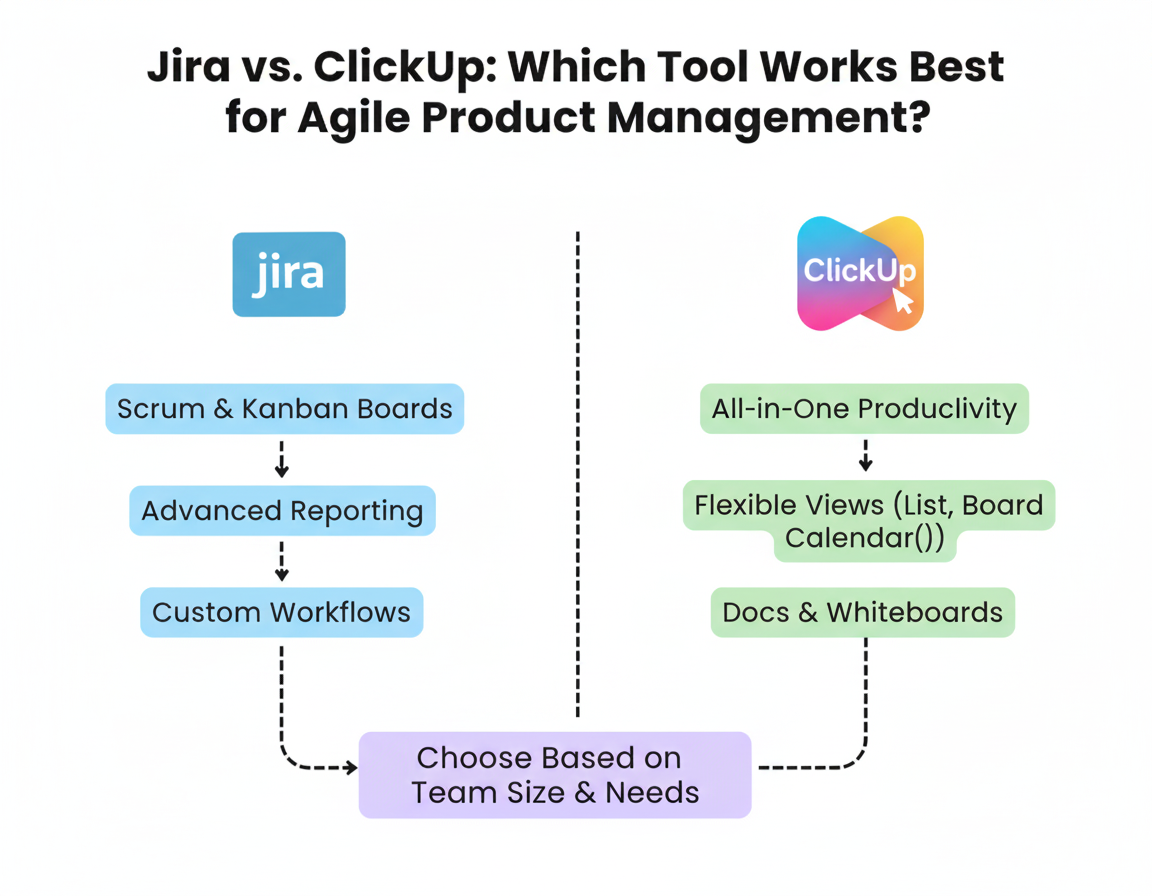
Jira vs. ClickUp: Best Agile Product Management Tool 2025 Headway: Comparing Jira and ClickUp for Agile Product Management Product management demands tools that support clarity, speed, and adaptability. Teams building software, SaaS, or digital products need platforms where planning, tracking, and collaboration work smoothly. Jira and ClickUp are among the most popular options. Each offers strengths and trade-offs when applied to agile workflows, backlogs, roadmaps, sprint planning, and feedback loops. At Product Siddha we often help teams make the right choice for their product lifecycle, aligning tool features with methods and process needs. Core Features and Differences Below are core dimensions that matter for agile product management, and how Jira and ClickUp compare. Feature Jira ClickUp Backlog & Sprint Planning Built for software engineering teams. Strong support for Scrum boards, Kanban, epics, stories, tasks. Deep integration with code management. Flexible views (List, Board, Gantt, Calendar). Easier to set up for small or mixed teams. Can mimic sprints with custom statuses or “Sprint Box” templates. Roadmapping & Prioritisation Jira Product Discovery helps capture ideas, prioritise features, and create roadmaps tied to delivery work. ClickUp provides visual roadmap templates, product vision boards, and goal alignment dashboards. Prioritisation via custom fields, priorities, and dependencies. (ClickUp) Documentation & Collaboration Jira is part of a suite that usually includes Confluence (in many setups) for docs; collaboration is often external or via issue comments. Strong with engineering‐oriented tasks. ClickUp includes Docs, Whiteboards, integrated discussion threads, comments, and attachments. Collaboration tends to be more visible across teams beyond engineering. Flexibility vs Rigidity Very strong support for workflows, permissions, issue types, and custom fields. But this comes with a steeper learning curve. Configuration overhead can slow teams without dedicated admins or discipline. More out-of-the-box flexibility. Easier to get started for non-technical or cross-functional teams. But very complex use cases may hit limits or need workarounds. Reporting, Metrics & Analytics Rich reporting: burn-down charts, cumulative flow diagrams, velocity tracking. Good for product managers concerned about productivity, forecasting, and technical debt. Dashboards are strong; Widgets and custom metrics help. But for deep engineering insight (e.g., commit-to-deploy, CI/CD integration), sometimes we need additional tools. Case Study: Product Siddha’s Approach At Product Siddha, we often advise early-stage startups or teams scaling up. In one recent project, we helped a mid-sized SaaS business select between Jira and ClickUp for their product management process. They had been using ClickUp for years for task tracking and general collaboration, but found difficulties when scaling agile practices. Background The team had about 25 people, split between engineering, design, product, and support. They used ClickUp for many tasks, but sprint planning, backlog grooming, and roadmaps were inconsistent. Prioritisation often depended on whoever shouted loudest. They lacked a stable engineering metrics system and found that “tasks stuck” or dependencies were missed. What We Did We mapped their product management process: how features are requested, how priorities are determined, how deliveries happen, and how feedback loops are managed. We defined what mattered: traceability, transparency, reporting, ability to connect feature requests to outcomes. We trialed both tools: configured ClickUp with stricter workflows, custom statuses, dependencies, and Gantt or roadmap views; and set up Jira for their backlog, epics, sprint boards, and integrated issue types. Outcome They found that ClickUp worked well for planning and early concept phases. Product managers liked its ease of use, documentation, and collaborative whiteboarding. But as teams grew, engineering felt that Jira offered more discipline: clearer epics, better handling of technical debt, better visibility for blockers, tighter backlog grooming. Eventually, the decision was to adopt hybrid use: Use ClickUp for documentation, planning, and cross-team collaboration (design, product, support) and use Jira for engineering execution, sprint tracking, and issue management. When Each Tool Works Best From what Product Siddha and others have seen, here are good fits: Choose Jira when your team needs strong structure around engineering: many dependencies, code integration, a need for detailed tracking of defects, technical backlog, and release management. Choose ClickUp when your team values flexibility: collaboration across functions (design/product/support), lighter-weight workflows, faster ramp-up, and fewer dedicated admin overheads. A Hybrid Approach often gives balance: one tool optimized for execution, another for broad visibility and product strategy. But hybrid demands discipline: keeping data in sync, ensuring people know where to look for what. Product Management Best Practices Regardless of Tool Whatever tool you pick, certain practices matter for product management to succeed: Define your backlog grooming process clearly. Regular reviews, definition of ready, prioritisation criteria. Ensure stakeholder alignment. Roadmaps must reflect business goals, not just engineering capacity. Communication matters. Use metrics that feed product decisions: lead time, cycle time, velocity, feature usage, and customer feedback. Keep feedback loops tight: after launches, gather data, iterate. Connect what customers say with what the backlog holds. Training and adoption: A tool is only as good as how people use it. Provide clear guidelines, templates, and governance (who updates what, who owns backlog, who marks what done). Considerations and Trade-Offs Cost: Jira often has licensing costs and sometimes adds-ons (workflow apps, additional storage); ClickUp may scale in cost depending on plan, seats, and feature needs. Learning curve: Jira’s flexibility means setup can be complex; teams without prior product management discipline may struggle. ClickUp is more forgiving, more adaptable, but it might lack some depth for mature engineering organisations. Integration with existing tools: If you are already using Confluence, Bitbucket, GitHub, or have CI/CD pipelines, Jira may integrate more naturally. If tools are diverse, ClickUp’s integrations are broad and useful. Governance and consistency: With flexibility comes risk of chaos. Unclear workflows, differing statuses, and inconsistent definitions of Done can create confusion, whatever tool you use. Closing Thoughts Choosing between Jira and ClickUp for agile product management depends on what your product team values and where it is in its growth. At Product Siddha, we believe the right tool is the one that matches process maturity, team size, and the product’s complexity. If your team is small or in early stages, or emphasizes cross-functional work, ClickUp may offer speed,

Blog, Product Analytics

5 Product Analytics Dashboards Every Product Manager Should Be Using in 2025

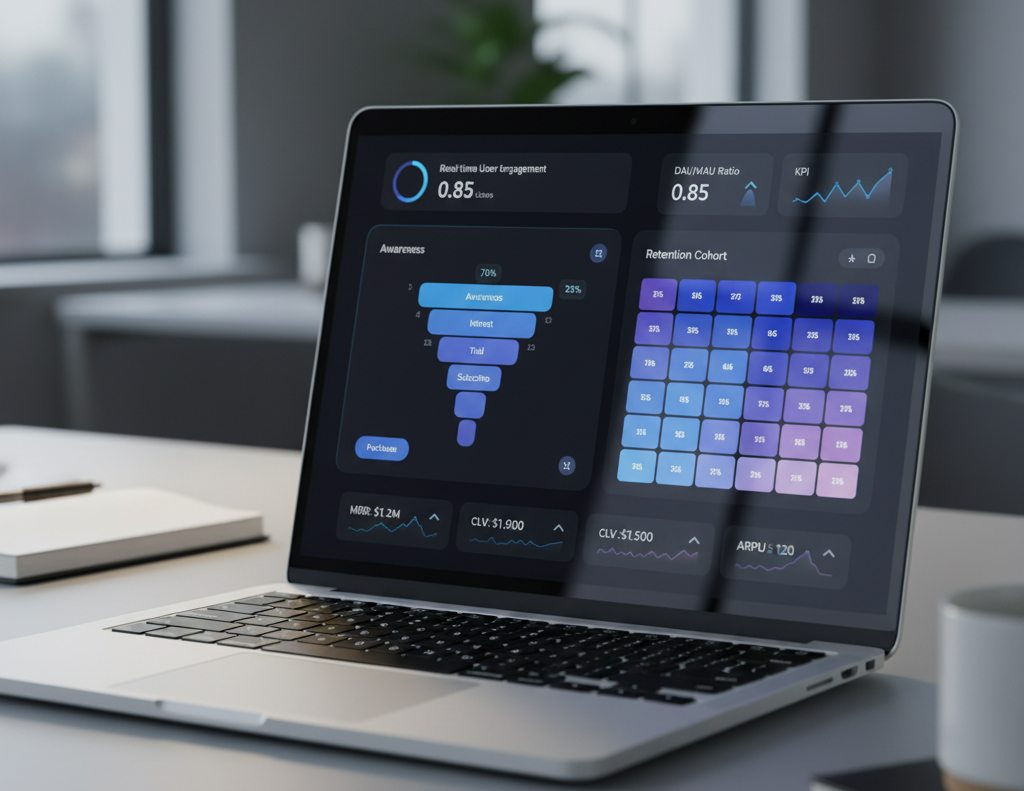
5 Product Analytics Dashboards Every Product Manager Should Be Using in 2025 Why Dashboards Matter In today’s product environment, data is more than an afterthought. It is the foundation for decisions that shape product growth, customer satisfaction, and operational efficiency. Without clear and reliable product analytics dashboards, managers risk working from guesswork rather than evidence. At Product Siddha, we have seen teams gain clarity and save resources once they adopt well-designed dashboards. These tools not only track numbers but also highlight trends, uncover weak spots, and help managers respond quickly to real conditions. 1. User Engagement Dashboard A product succeeds only if people use it regularly. A user engagement dashboard shows how often customers interact with features, how long they stay, and what parts of the product they abandon. Key metrics to track: Daily active users (DAU) and monthly active users (MAU) Feature adoption rates Session duration and frequency In a recent Product Siddha project for a mobile commerce client, the engagement dashboard revealed that nearly 40 percent of first-time users left after the second session. By identifying this point of friction, the team simplified the sign-up process and increased retention within three months. Engagement Metrics at a Glance Metric Why It Matters Example Insight DAU/MAU ratio Measures stickiness 25% ratio shows room to grow Feature adoption Highlights popular vs. unused features Low use may signal redesign Session frequency Indicates habit-forming use High drop-off shows barriers 2. Conversion and Funnel Dashboard Tracking how users move from awareness to purchase (or any goal action) is central to understanding value delivery. A funnel dashboard breaks down this journey step by step. Key metrics to track: Drop-off percentage at each funnel stage Conversion rates by device or channel Average time to conversion For one SaaS platform, Product Siddha used a funnel dashboard to discover that most drop-offs occurred between the free trial and paid plan stage. A revised onboarding message improved conversions by 15 percent without adding any new features. 3. Retention and Churn Dashboard Acquiring users is costly, so keeping them is more profitable. A retention dashboard measures how many users return over weeks or months, while churn dashboards show when and why they leave. Key metrics to track: Retention cohorts by week or month Churn rate and its correlation with product updates Net promoter score (NPS) trends A client in the financial services sector worked with Product Siddha to build a churn dashboard. The results showed a link between delayed support responses and higher cancellations. After improving support workflows, churn fell by 12 percent within two quarters. 4. Revenue and Monetization Dashboard For managers, it is not enough to know how users behave. Understanding how those actions translate into revenue is critical. A revenue dashboard connects product usage with financial outcomes. Key metrics to track: Monthly recurring revenue (MRR) Customer lifetime value (CLV) Average revenue per user (ARPU) During an analytics engagement, Product Siddha helped an e-learning platform uncover that a small percentage of power users contributed to over 60 percent of revenue. This insight allowed the client to develop premium packages, improving margins without alienating entry-level customers. 5. Operational Performance Dashboard Behind every product lies an operational engine of development, support, and delivery. An operational performance dashboard monitors the efficiency of these processes. Key metrics to track: Development cycle time Bug resolution rates Support ticket response time Product Siddha introduced an operational dashboard for a logistics app. By tracking development cycle time, the team spotted delays caused by manual QA bottlenecks. Automating regression tests shortened release cycles by 25 percent while reducing errors. Putting Dashboards Into Action A dashboard is only useful if it influences action. Product managers should: Review dashboards at regular intervals instead of letting data accumulate. Share insights across design, engineering, and marketing teams. Connect dashboard findings with roadmap planning. Product Siddha emphasizes this practice during consulting engagements. In one retail project, weekly dashboard reviews aligned teams quickly, preventing costly rework and improving customer experience. Final Thoughts The year 2025 is shaping up to be one where product managers cannot afford to work without precise data. The five dashboards outlined above form a foundation for making reliable, evidence-based decisions. By combining user engagement, funnel tracking, retention analysis, revenue insights, and operational monitoring, managers can see not only what customers are doing but also how their actions connect to business results. For organizations seeking guidance, Product Siddha provides tailored analytics consulting that ensures dashboards are not just reports but living tools for growth. The lesson is simple: a good dashboard saves time, lowers costs, and improves quality all at once.

AI Automation, Blog

AI-Powered Email Marketing for Smarter Campaigns in 2025

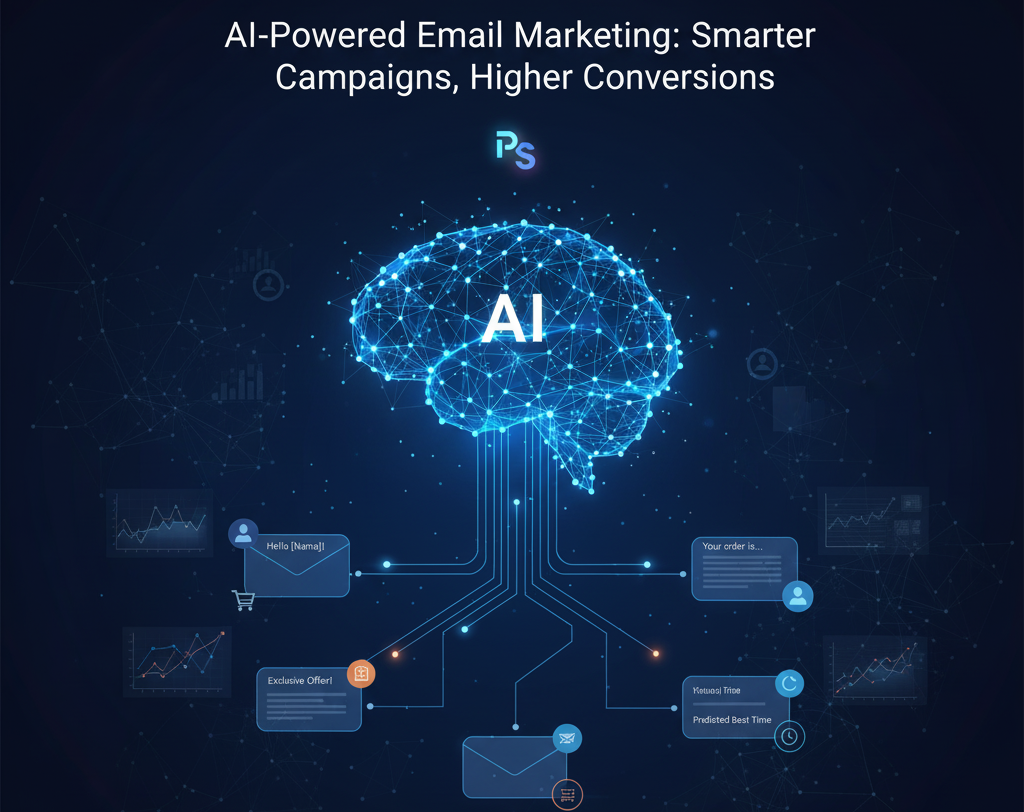
AI-Powered Email Marketing for Smarter Campaigns in 2025 In fact, studies show that personalised emails can deliver up to six times higher transaction rates compared to generic campaigns. Yet, most businesses still struggle with data silos, poor segmentation, and inconsistent messaging. This is where AI-powered email marketing makes a difference; it not only automates repetitive tasks but also predicts customer behavior, recommends content, and ensures the right message reaches the right person at the right time. By combining advanced algorithms with proven marketing strategies, businesses can transform their email campaigns into intelligent customer journeys. Instead of relying on guesswork, AI analyses customer actions, preferences, and historical data to create emails that truly resonate. This shift from “send-to-all” blasts to adaptive, data-driven communication is helping brands build deeper trust and stronger relationships. At Product Siddha, we enable brands to unlock this potential by integrating AI into their email strategies. From smarter segmentation and subject line optimisation to predictive analytics and automated workflows, we help businesses move beyond traditional campaigns and into a future where every email feels personal, timely, and relevant. Why AI Matters in Email Marketing AI tools allow you to analyse subscriber behaviour, past engagements, purchase history, and many small signals. These signals help: Segment your audience more precisely (who clicks, who opens, who buys) Personalise subject lines and content so that each recipient feels the message is made for them Predict optimal send times so emails arrive when people are most likely to open them Automate follow-ups, drip campaigns, and re-engagement journeys to reduce manual effort These improvements contribute to increased open rates, higher click-through rates, lower unsubscribe rates, and overall better conversion. Semantic keywords like customer engagement, personalised campaigns, email automation, conversion optimisation, behavioural segmentation, dynamic content are central to this approach. How Product Siddha Uses AI in Real Campaigns However, we can outline what we do when working with a client in, for example, B2B SaaS or e-commerce: Data audit and list hygiene: We start by cleaning up the email list, removing inactive addresses, and verifying deliverability. Bad addresses or unengaged leads drag metrics (open rate, spam complaints) down. Audience segmentation: Using AI-driven segmentation based on engagement (who opened past emails, who clicked), demographic or firmographic data, and purchase or usage history. This lets us send different content to different segments rather than one size fits all. Personalisation & dynamic content: For example, recommending products based on recently browsed items or purchases. Or altering email copy depending on lead stage (trial vs. long-term customer) or behavioral triggers (cart abandonment, inactivity, etc.). Optimising subject lines & send times: AI tools suggest better wordings, test variants (A/B or multivariate testing), and schedule sends when each segment is most likely to open. Feedback loops & continuous improvement: We monitor open rates, click-throughs, conversion paths (did the user click through to product, did they sign up, did they buy), then refine segments, content, and timing. A hypothetical example: A Product Siddha client in e-commerce saw their open rate rise from 18% to 30% in three months after applying behaviour-based segmentation and AI-optimised send times; click-through from 2.5% to 5%; conversion from click to purchase increased 1.8×. (This is typical of results we aim for, though exact numbers vary.) Key Strategies for Higher Conversions To make AI-powered email campaigns deliver, certain best practices matter. Strategy Why It Matters What To Do Personalised content Generic emails are ignored. Tailored content boosts relevance. Use dynamic content blocks; include products or content based on previous interactions. Behaviour-based triggers Responding to action (or inaction) is more effective than periodic blasts. Abandoned cart, browsing without purchase, re-engagement sequences. Subject line and preheader optimisation First impressions decide if the email is opened. Use AI tools to generate options; test what resonates (curiosity, urgency, benefit). Optimal send time Even a good email fails if it lands when recipient is unlikely to check. Let AI predict time of highest engagement per user; schedule accordingly. Frequent testing & metrics tracking Without measurement you cannot improve. Track opens, CTR, conversion rate, unsubscribe rate; do A/B tests; iterate. Pitfalls to Avoid Over-automation that feels robotic or generic Ignoring data privacy, overstepping boundaries (too frequent emails, inappropriate content) Heavy discounting hurting brand value; better to emphasise value and trust rather than always pushing price cuts Sending irrelevant offers; using AI does not remove the need for understanding your customers Case Study From Outside That Inspires A recent study by Deloitte in health care showed how personalisation and cognitive tools reduced the opt-out rate by 50 percent. They analysed years of data, identified preferences in content type, timing, and channel, and used that insight to send only relevant information to each provider. Another example: Draper James improved its conversion among first-time purchasers by ten times using AI and marketing automation tools. Segmenting audiences, tailoring content, and automating many of its email flows saved time and boosted results. These stories illustrate what Product Siddha helps clients achieve when applied with care. What to Do First If you are planning to use AI-powered email marketing for your business: Audit your current email campaigns and data. What works, what does not. Select tools that support behavioural segmentation, dynamic content, subject line testing, and send-time optimisation. Map out your customer journey. Define triggers: subscription, purchase, lapse, etc. Write content drafts, templates, and plan for variation. Let AI assist, but ensure human review, tone, and brand voice. Start small: maybe one segment, one trigger. Measure open rates, CTR, and conversion. Scale gradually. Bringing It Together Email marketing remains one of the most reliable channels for converting leads into customers. When AI is used thoughtfully, campaigns become smarter, more relevant, more aligned with how users behave and what they expect. At Product Siddha we believe that combining AI tools with discipline, good data, and respect for your audience leads to campaigns with higher conversions and sustained growth.

Cut Development Costs without losing quality
Blog, Product Management

Smart Strategies to Reduce Development Costs and Keep Quality Intact

Smart Strategies to Reduce Development Costs and Keep Quality Intact Striking the Right Balance In software development, managing cost while preserving quality is a constant concern for decision-makers. Organizations seek efficiency and reduced spending, yet users expect reliability and performance in every release. The challenge is not only financial but also strategic, as choices made during development directly shape long-term outcomes. Smart approaches allow businesses to maintain high standards without unnecessary expense. This requires discipline in planning, clarity in execution, and careful use of the right tools and methods. At Product Siddha, the focus has always been on guiding clients toward solutions that reduce waste while preserving value. Through structured product management and thoughtful use of automation, the company has helped firms across sectors build software that meets expectations without overrunning budgets. Why Cost Reduction Matters Without Compromising Quality Rising demand for faster delivery, higher feature expectations, and increasing technology costs have made efficient project planning more important than ever. Reducing development costs is not just about spending less. It is about using the right processes, tools, and team practices to get more value out of the same investment. Cost without quality leads to customer churn, higher maintenance costs, and poor adoption. Quality without cost control leads to overspending, missed deadlines, and reduced return on investment. Companies that succeed are those that integrate smart cost-cutting with disciplined quality assurance. Strategy 1: Build a Clear and Detailed Roadmap One of the most effective ways to manage costs is to plan carefully at the start. A roadmap defines which features matter most and helps avoid wasted effort on unnecessary development. Product Siddha used a minimum viable product (MVP) approach with the client. Instead of building all features at once, the team focused on the top three features that drove customer value. This reduced the budget by 30 percent in the first phase while still ensuring strong adoption. Key takeaway: Roadmaps that align business goals with technical execution save both money and time. Strategy 2: Embrace Agile Development Agile methods, when done correctly, allow teams to release working features in small iterations. This reduces rework, ensures early feedback, and prevents the waste of large upfront investments. Sprints allow testing at every stage. Regular reviews ensure alignment with customer expectations. Continuous integration reduces defects later in the cycle. Check Product Siddha, how Agile adoption reduced post-release bugs by 40 percent for a SaaS client, cutting maintenance costs significantly. Strategy 3: Use the Right Automation Tools Automation reduces repetitive tasks, minimizes errors, and accelerates delivery. Tools like N8N, Make.com, Zapier, and Flowise automate workflows across systems, while platforms such as Jira, ClickUp, and Notion streamline project tracking. By integrating automation into both development and management processes, Product Siddha helped one retail client save more than 200 development hours annually, directly lowering operational expenses. Chart: Cost Savings from Automation Tools Tool Average Hours Saved Per Month Cost Reduction (%) Zapier 25 10-12 N8N 40 15 ClickUp + Jira 30 8-10 Strategy 4: Prioritize Product Analytics Decisions guided by data are more cost-effective than those based on assumptions. Tools like Mixpanel, Amplitude, and Looker Studio reveal how users interact with a product, showing which features to prioritize and which to drop. For example, Product Siddha worked with a fintech startup to analyze usage patterns. They discovered that 70 percent of customers never used two costly features. Removing them from the development pipeline saved nearly $50,000 while keeping user satisfaction high. Strategy 5: Outsource With Caution and Clarity Outsourcing certain development tasks can reduce costs, but without clear contracts and expectations, it can lead to hidden expenses. The best practice is to outsource well-defined, modular tasks while keeping core intellectual property in-house. Product Siddha advises clients to use outsourcing for short-term, non-core activities like testing or integrations. This ensures cost control while preserving quality in the most critical parts of the system. Strategy 6: Invest in Early Testing and Quality Assurance Testing is often seen as an expense, but early testing prevents defects that become costlier later. Incorporating quality checks into every sprint reduces post-release issues. Automated testing tools detect issues quickly. User acceptance testing ensures real-world performance. A healthcare project handled by Product Siddha showed that by investing 15 percent of the budget in early QA, the company avoided 60 percent of potential rework costs. Strategy 7: Build Scalable Architectures Short-term savings can be wiped out if systems are not built to scale. Using cloud-native architectures, modular coding practices, and modern DevOps pipelines ensures that systems handle future growth without costly rewrites. Strategy 8: Encourage Cross-Functional Collaboration Poor communication between teams often results in duplication of work, overlooked bugs, and scope creep. Cross-functional collaboration aligns design, engineering, and product management. At Product Siddha, workshops with stakeholders and regular alignment sessions cut down miscommunication errors. This resulted in smoother delivery and nearly 20 percent cost savings for a consumer app project. Final Thoughts Reducing software development costs while maintaining quality is not about shortcuts. It is about intelligent planning, careful use of tools, and disciplined processes. Companies that adopt smart roadmaps, data-driven decisions, and robust automation find themselves better positioned for both savings and long-term growth. For businesses looking to achieve this balance, Product Siddha provides consulting and implementation services that combine strategy, analytics, and automation. The result is clear: lower costs, higher efficiency, and products that customers trust.

Blog, Product Management

AI App Development in Australia: Key Features, Costs, and What to Expect

AI App Development in Australia: Key Features, Costs, and What to Expect The Australian technology landscape stands at a pivotal moment. Businesses across the continent recognize artificial intelligence as the driving force behind digital transformation, fundamentally changing how applications function and deliver value to users. Understanding the nuances of AI app development in Australia becomes essential for companies seeking competitive advantages in an increasingly connected economy. The AI market in Australia is projected to grow to $315 billion by 2028, according to CSIRO, highlighting the tremendous opportunity for businesses investing in intelligent applications. This growth trajectory reflects both government support and private sector enthusiasm for AI-powered solutions that address real-world challenges. Australian organizations are moving beyond experimental implementations to serious artificial intelligence integration across industries. Key trends include greater AI adoption in healthcare, finance, and logistics for automation and predictive insights, alongside a rise in ethical AI practices due to Australia’s strong data protection laws. These developments create unique opportunities for businesses ready to embrace AI application development. The Australian AI Development Landscape Australia’s artificial intelligence ecosystem demonstrates remarkable growth patterns that distinguish it from other markets. AI-related patents nearly quadrupled from 170 in 2015 to 629 in 2024, while research publications more than doubled over the same period. This research-to-application pipeline creates fertile ground for innovative AI app development projects. The regulatory environment supports responsible AI development through comprehensive privacy frameworks and ethical guidelines. Australian businesses benefit from clear regulatory pathways that encourage innovation while protecting user interests and data sovereignty. This balance attracts international investment and positions Australia as a trusted destination for AI application development. Geographic advantages also play a significant role. Australia’s proximity to Asia-Pacific markets creates opportunities for AI applications that serve diverse cultural contexts and business environments. Local development teams understand regional preferences and compliance requirements that global competitors might overlook. Essential Features for Australian AI Applications Modern AI applications developed for the Australian market require specific capabilities that address local business needs and user expectations. Machine learning algorithms form the foundation, enabling applications to learn from user interactions and improve performance over time. Natural Language Processing and Voice Recognition Australian AI applications increasingly incorporate natural language processing capabilities that understand regional dialects and colloquialisms. Voice recognition systems must account for Australian accents and speech patterns to deliver seamless user experiences. NLP remains at the forefront of AI trends in 2025, with custom development companies leveraging it for automated customer service systems, sentiment analysis, and voice-to-text solutions. Predictive Analytics and Decision Support Business intelligence features help Australian organizations make data-driven decisions through predictive modeling and pattern recognition. These capabilities prove particularly valuable in sectors like agriculture, mining, and retail, where environmental factors and consumer behavior create complex decision-making scenarios. Computer Vision and Image Recognition Visual recognition capabilities enable applications to process and understand visual information, supporting use cases from quality control in manufacturing to medical diagnosis in healthcare settings. Australian businesses leverage these features for automation and precision tasks that reduce human error and increase efficiency. Integration and Connectivity Modern AI applications must integrate seamlessly with existing business systems and third-party services. API connectivity, cloud infrastructure compatibility, and enterprise software integration capabilities ensure AI applications enhance rather than disrupt established workflows. Cost Structure and Investment Expectations Understanding the financial aspects of AI app development in Australia requires consideration of multiple variables that influence project budgets. Development costs vary significantly based on complexity, feature requirements, and implementation timelines. Development Phase Investments Mobile app development costs in Australia range from AUD 15,000 to 300,000, with AI features adding a premium to base development expenses. Initial development phases typically require investments between $20,000 and $80,000 for mid-complexity AI applications, depending on the sophistication of machine learning models and data processing requirements. Ongoing Operational Expenses AI applications require continuous investment in cloud computing resources, data storage, and model training infrastructure. Monthly operational costs range from $500 to $5,000 for typical business applications, scaling with user volume and computational complexity. Businesses should budget for these recurring expenses alongside initial development investments. Team and Talent Costs Australian AI development talent commands premium rates reflecting strong demand and limited supply. Machine learning engineers, data scientists, and AI specialists typically earn between $90,000 and $160,000 annually, with senior professionals commanding higher compensation packages. Project-based engagements often cost between $150 and $300 per hour for specialized AI development services. Infrastructure and Technology Licensing Cloud computing platforms, AI frameworks, and specialized software tools contribute to overall project costs. Businesses should expect monthly infrastructure expenses ranging from $200 to $2,000, depending on application requirements and user base size. Enterprise-grade AI platforms may require additional licensing fees. Industry Applications and Success Stories Australian organizations across various sectors demonstrate successful AI app implementation strategies that deliver measurable business value. Healthcare applications leverage machine learning for diagnostic support and patient management, while financial services employ AI for fraud detection and risk assessment. Healthcare Innovation Opyl Limited applies AI to biostatistics and clinical trial design, delivering simulation-based services to guide strategic decisions across pharmaceutical development phases. Their platform demonstrates how Australian companies successfully commercialize AI applications for specialized industry needs. Agricultural Technology Smart farming applications use AI to optimize crop yields, monitor soil conditions, and predict weather impacts on agricultural operations. These solutions help Australian farmers increase productivity while reducing environmental impact through precise resource management. Mining and Resources Sixty percent of Australian mines are preparing to adopt AI solutions by 2025, focusing on productivity and sustainability improvements. AI applications in this sector address safety monitoring, equipment predictive maintenance, and resource extraction optimization. Development Process and Timeline Expectations Successful AI app development in Australia follows structured methodologies that ensure quality outcomes within reasonable timeframes. Development timelines can range from one month to one year, depending on project requirements and team size. Discovery and Planning Phase Initial project phases involve requirement analysis, feasibility assessment, and technical architecture design. This stage typically requires 2-4 weeks and establishes project scope, technology stack selection, and development roadmap. Thorough planning prevents costly revisions

AI Automation, Blog

Ensuring Ethical AI Automation: What Product Managers Should Know in 2025

Ensuring Ethical AI Automation: What Product Managers Should Know in 2025 Product managers today face an unprecedented challenge. As AI automation reshapes entire industries and transforms how we build products, the question is no longer whether to integrate these technologies, but how to do so responsibly. The rapid adoption of automated systems powered by artificial intelligence demands a new framework for ethical decision-making that balances innovation with accountability. The stakes have never been higher. McKinsey research shows that by 2030, AI automation could handle up to three hours of daily workplace activities, fundamentally changing how products function and how users interact with technology. This transformation brings tremendous opportunities alongside significant responsibilities. The Current Landscape of AI Automation Ethics The ethical implications of AI automation extend far beyond simple compliance requirements. Harvard researchers identify three major areas of ethical concern: privacy and surveillance, bias and discrimination, and the fundamental question of human judgment in automated systems. Product managers must navigate these complex issues while delivering value to users and stakeholders. Modern product teams cannot treat ethical considerations as an afterthought. The integration of machine learning algorithms, predictive analytics, and automated decision-making systems into product workflows requires proactive ethical frameworks from the earliest stages of development. This approach protects both users and organizations from unintended consequences that can damage trust and reputation. Recent industry developments highlight the urgency of this challenge. Research shows that 66% of CEOs report measurable business benefits from generative AI initiatives, particularly in operational efficiency and customer satisfaction. However, these benefits come with increased responsibility for ethical implementation and ongoing oversight. Core Principles for Ethical AI Automation Product managers must anchor their AI automation strategies in fundamental ethical principles. Forrester identifies five key principles: fairness and bias reduction, trust and transparency, accountability, social benefit, and privacy and security. These principles serve as guideposts for product decisions throughout the development lifecycle. Transparency and Explainability Users deserve to understand how automated systems make decisions that affect them. Product managers should prioritize the development of explainable AI systems that provide clear reasoning for automated recommendations or actions. This transparency builds trust and enables users to make informed decisions about their interactions with AI-powered features. Bias Prevention and Fairness Automated systems can inadvertently perpetuate or amplify existing biases present in training data or algorithmic design. Product managers must implement systematic approaches to identify and mitigate these biases. Regular ethical audits and diverse development teams help reduce blind spots in product design and minimize discriminatory outcomes. Privacy by Design AI automation often requires extensive data collection and processing. Product managers should embed privacy protections into the fundamental architecture of their systems rather than treating privacy as a compliance checkbox. This includes data minimization, purpose limitation, and user control over personal information. Practical Implementation Strategies Translating ethical principles into actionable product decisions requires concrete implementation strategies. Product managers need practical frameworks that guide daily decisions while supporting long-term product vision and user trust. Establishing Ethical Review Processes Successful product teams implement structured ethical review processes for AI automation features. These processes include cross-functional collaboration with legal, security, and data science teams to evaluate potential risks and benefits. Regular reviews ensure that ethical considerations remain central to product evolution as AI capabilities expand. Building Diverse and Inclusive Teams Team composition directly impacts the ethical quality of AI automation systems. Product managers should advocate for diverse teams that bring varied perspectives to product development. Different backgrounds, experiences, and viewpoints help identify potential ethical issues that homogeneous teams might overlook. User-Centered Design for AI Features Ethical AI automation prioritizes user agency and control. Product managers should design systems that augment human capabilities rather than replace human judgment entirely. This includes providing users with meaningful choices about automated features and clear pathways for human intervention when needed. Real-World Applications and Case Studies The practical implementation of ethical AI automation varies significantly across industries and use cases. Understanding how leading organizations approach these challenges provides valuable insights for product managers developing their own ethical frameworks. Customer Experience Automation LATAM Airlines demonstrates effective ethical AI implementation by using Google Cloud AI to automate data management and governance while enhancing customer experience. Their approach focuses on process optimization rather than replacing human customer service representatives entirely. The automation handles routine data classification tasks while preserving human oversight for complex customer interactions. Energy Grid Management Siemens Energy’s 2025 deployment of AI-powered grid orchestration across European nations shows how ethical automation can serve broader social benefits. Their system integrates weather forecasts, demand patterns, and energy outputs to predict and prevent shortages while maintaining human oversight of critical infrastructure decisions. Content Creation and Development Modern product teams increasingly rely on AI automation for content generation, code development, and creative processes. Companies implementing these systems successfully start with pilot programs across customer support and development teams before expanding company-wide. They maintain API-level access controls and usage monitoring to ensure responsible deployment. Building Governance Frameworks Ethical AI automation requires robust governance structures that evolve with technological capabilities and organizational needs. Product managers must establish clear accountability mechanisms and decision-making processes that support both innovation and responsibility. Stakeholder Engagement and Communication AI product managers must bridge understanding between technical practitioners and non-technical stakeholders, communicating tradeoffs in model choices, explainability, and ethical considerations. This communication ensures that ethical decisions receive appropriate organizational support and resources. Continuous Monitoring and Improvement Ethical AI automation is not a one-time implementation but an ongoing process of monitoring, evaluation, and improvement. Product managers should establish metrics and monitoring systems that track ethical outcomes alongside traditional product metrics. Regular assessment helps identify emerging ethical issues before they impact users or business operations. Regulatory Compliance and Beyond While regulatory compliance provides a baseline for ethical behavior, product managers should aim higher. UNESCO’s global recommendations emphasize that human rights and dignity should be the cornerstone of AI implementation, based on transparency and fairness principles. This approach protects organizations from future regulatory changes while building stronger user trust. Preparing for the Future The landscape of AI

Blog, Product Management

API Integration in 2025: How to Choose the Right Company for Your Business Needs

API Integration in 2025: How to Choose the Right Company for Your Business Needs The landscape of business technology continues to evolve rapidly, with up to 70% of enterprises expected to rely on cloud-based integration solutions by 2025. This shift toward interconnected systems has made API integration a critical component of modern business operations. Yet many organizations struggle to identify the right API integration company that can handle their specific requirements while delivering measurable results. At Product Siddha, we set up lean, automated systems so your product and marketing run smoothly. Our experience working with diverse enterprise clients has revealed the key factors that separate successful API integration partnerships from costly implementations that fail to meet business objectives. The challenge lies not just in connecting systems but in creating integrations that scale, remain secure, and adapt to changing business needs. Here is a comprehensive guide to selecting an API integration company that aligns with your 2025 business strategy. Understanding the Current API Integration Landscape API-first development will be essential for businesses operating in dynamic markets where scalability is a key competitive advantage. The integration services market reflects this trend, with the global Enterprise Application Integration market expected to reach $42.45 billion by 2029 at 16.5% growth. This growth indicates both opportunity and complexity. More providers enter the market each year, but not all possess the expertise needed for enterprise-grade implementations. Organizations must evaluate potential partners based on proven capabilities rather than marketing promises. Key Market Drivers in 2025: Driver Impact on Integration Strategy Business Implication Cloud-first Architecture 70% adoption rate Hybrid integration requirements Microservices Growth Modular system design Complex orchestration needs AI Integration Enhanced automation Advanced processing capabilities Security Regulations Zero Trust models Comprehensive compliance requirements The companies that succeed in this environment combine technical expertise with a deep understanding of business processes and industry-specific requirements. Essential Capabilities Your API Integration Company Must Have Proven Experience with Your Technology Stack Look for an API integration company that demonstrates concrete experience with your existing technology environment. Generic integration experience rarely translates well to specific platform combinations or industry requirements. Ask potential partners to provide detailed case studies showing similar implementations. Request references from clients using comparable technology stacks. This verification process reveals whether the company understands the nuances of your particular integration challenges. Security-First Approach to Integration Architecture New security standards and protocols specifically tailored for APIs will likely focus on enhancing authentication mechanisms, improving data encryption and standardizing API security best practices. Your integration partner must understand these evolving security requirements. Evaluate their approach to authentication, data encryption, and access control. Examine their experience with compliance requirements relevant to your industry. Review their incident response procedures and ongoing monitoring capabilities. Security Evaluation Framework: Authentication and authorization mechanisms Data encryption at rest and in transit API gateway security features Compliance certification and auditing Incident response and monitoring procedures Scalability Planning and Performance Optimization Businesses leveraging API-first design are delivering features 40% faster than traditional models. However, speed means nothing without the ability to handle growth in data volume, user load, and system complexity. Your chosen API integration company should provide detailed scalability assessments and performance benchmarks. They should explain how their solutions handle increased load, peak traffic periods, and system expansion requirements. Evaluation Criteria for API Integration Companies Technical Competency Assessment Beyond basic technical skills, evaluate the company’s ability to handle complex integration scenarios. Request detailed technical proposals that address your specific requirements rather than generic solutions. Look for expertise in multiple integration patterns including point-to-point connections, hub-and-spoke architectures, and event-driven integrations. Assess their knowledge of modern integration technologies such as message queues, API gateways, and container orchestration. Project Management and Communication Practices Successful API integration projects require careful coordination between technical teams, business stakeholders, and external vendors. Evaluate potential partners based on their project management methodologies and communication practices. Ask about their approach to requirement gathering, progress reporting, and change management. Review their documentation standards and knowledge transfer procedures. Strong integration companies provide clear project timelines with realistic milestones and regular status updates. Post-Implementation Support and Maintenance API integrations require ongoing maintenance, monitoring, and optimization. Your integration partner should provide comprehensive support services that extend beyond initial implementation. Support Service Categories: Ongoing Support Structure ├── Technical Monitoring │ ├── Performance Metrics │ ├── Error Detection │ └── System Health Checks ├── Maintenance Services │ ├── Security Updates │ ├── Platform Upgrades │ └── Configuration Changes └── Enhancement Support ├── Feature Additions ├── Scaling Adjustments └── Optimization Improvements Evaluate their monitoring capabilities, response times for critical issues, and procedures for handling platform updates or changes. Industry-Specific Considerations Different industries have unique integration requirements based on regulatory compliance, data sensitivity, and operational workflows. Choose an API integration company with demonstrated experience in your specific sector. Healthcare organizations need partners who understand HIPAA compliance and patient data protection requirements. Financial services companies require expertise in PCI DSS standards and fraud detection systems. Manufacturing businesses need integration specialists familiar with supply chain management and inventory tracking systems. Ask potential partners about their industry certifications, compliance expertise, and relevant case studies. Generic integration experience rarely addresses the specific challenges and requirements of specialized industries. Cost Structure and Value Assessment API integration projects vary significantly in complexity and cost. Avoid companies that provide generic pricing without understanding your specific requirements. Look for transparent pricing models that align costs with delivered value. Cost Evaluation Framework: Cost Component Evaluation Criteria Questions to Ask Initial Development Fixed vs. time-based pricing What is included in base cost? Integration Complexity Per-connection or flat fee How are complex integrations priced? Ongoing Maintenance Monthly or annual contracts What support services are included? Additional Services Training, documentation What additional costs might arise? Request detailed proposals that break down costs by project phase and deliverable. Compare total cost of ownership rather than just initial implementation fees. Red Flags to Avoid When Selecting Partners Several warning signs indicate potential problems with API integration companies. Avoid partners who cannot provide specific references, detailed technical proposals, or